
-
×
 Iman Gadzhi - 6 Figure SMMA
1 × $ 25.00
-
×
 Tether Lab – Psychology-Based Creative Strategy & Ad Performance
1 × $ 25.00
-
×
 EPC Institute - Matt Bacak - Email Marketing Specialist (incl. Bonus)
2 × $ 35.00
-
×
 Adam Enfroy – Blog Growth Engine Mastermind
1 × $ 40.00
-
×
 Nick Theriot – Facebook Ads That Scale
1 × $ 75.00
Sale!

Meredith Marsh – 30 Days to a Thriving YouTube Channel


Original price was: $ 297.00.$ 30.00Current price is: $ 30.00.
Meredith Marsh’s 30-day YouTube course covers channel strategy, scripting, filming, editing, optimization and analytics. It includes short video lessons and editable templates and checklists.
Description
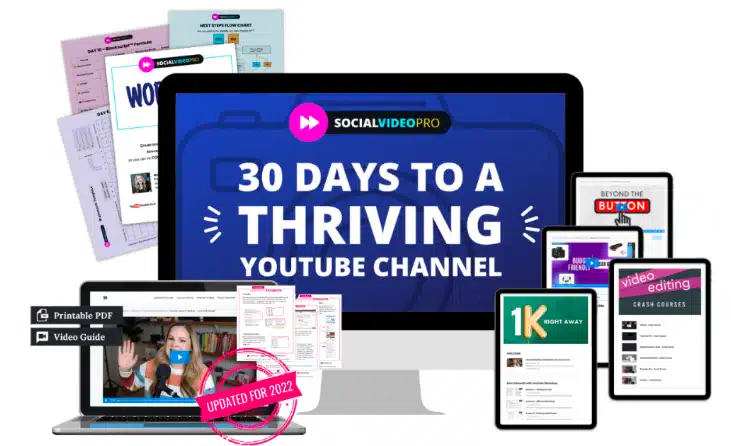
30 Days to a Thriving YouTube Channel is Meredith Marsh’s practical course for planning, producing and improving YouTube videos. It follows a day-by-day roadmap from channel setup through scripting, filming, editing, upload optimization and analytics.
The course combines short video lessons, each approximately 5–10 minutes long, with editable templates and checklists. Its action-first format is designed for creators starting a channel or working to build an existing one.
YouTube channel skills covered
- Define your channel’s purpose and ideal audience.
- Organize and refine video topics using templates.
- Map out your first two weeks with a clear action plan.
- Create engaging content that attracts real viewers.
- Optimize every upload for maximum reach and growth.
- Analyze your performance to fuel ongoing success.
A practical approach to YouTube creation
Each lesson ends with a task, helping creators put the material into practice as they move through the roadmap. Editable resources can be adapted to different niches, while short lessons break larger production tasks into manageable steps.
The curriculum brings together topic selection, scripts, recording, editing, optimization and measurement. It is relevant whether YouTube is a part-time project or part of a broader career plan.
Course phases: the 30-day blueprint
The roadmap begins with a rapid setup phase and continues through six numbered phases, ending with a review of channel data and a plan for the next production cycle.
Phase 0: Super Fast Setup, days 1–3
Start with a niche clarity workshop to establish the channel’s purpose, intended audience and distinctive angle. Use preformatted Notion or Google Doc templates to collect and refine potential topics.
A downloadable calendar and checklist help map the first two weeks. The phase aims to leave you with a clear focus and a prioritized list of 10 video ideas.
Phase 1: Niche Channel Strategy, days 4–10
Explore free and paid keyword research tools to find topics with high traffic and low competition. Spiderweb content mapping connects related video ideas so that individual uploads can lead viewers toward other relevant content.
The thumbnail and title formula introduces design and copy principles for searchable titles and eye-catching thumbnails. The phase sets a goal of publishing three videos based on search-validated topics.
Phase 2: Blockscript Formula, days 11–15
Build scripts around a six-step storytelling blueprint for turning everyday experiences into narratives. The Blockscript workflow divides a video into modular sections: hook, value, engagement prompt and call to action.
Lessons also cover natural ways to invite subscriptions and interaction. The phase includes a target of recording two scripted videos in half the usual time.
Phase 3: Record with Confidence, days 16–19
The gear essentials guide covers smartphone and DSLR setups, with attention to clear sound, sharp images and flattering light. Exercises and prompts address a conversational on-camera presence.
Printable shot lists help organize angles and B-roll for a filming session. The phase sets a target of filming the next videos in under two hours.
Phase 4: B.F.F. Editing Method, days 20–23
Follow a beginner-friendly workflow from raw footage to a finished video using software such as Adobe Premiere Rush or DaVinci Resolve. The lessons discuss keyboard shortcuts, batch processing and split edits as ways to make editing more efficient.
Create reusable presets and graphics templates for intros, lower thirds and thumbnails. The phase includes a goal of editing a 10-minute video in under an hour, with cuts, transitions and branded elements.
Phase 5: Optimize Like a Boss, days 24–26
Use a copy-and-paste upload checklist to work through titles, descriptions, tags, end screens, cards and chapters. The SEO lessons cover keyword-rich descriptions and timestamps.
Channel branding topics include playlists, banners and featured links that help guide viewers through related content. The phase applies the optimization process to the next three uploads.
Phase 6: Analyze and Revise, days 27–30
Review watch time, retention, click-through rate and subscriber growth in YouTube Studio. The lessons explain how to spot issues such as viewer drop-off points and low impression click-through rates, then consider targeted changes.
Use what the data reveals to revise thumbnails, titles and content angles. The phase closes by identifying strong content patterns and developing a roadmap for the next 30 days of production.
Lessons, templates and checklists
The downloadable course materials include videos, documents and PDFs. The lessons are supported by editable Notion, Google Docs and PDF resources, including content calendars, shot lists, upload checklists and analytics dashboards.
Who can use the roadmap
The course is designed for new creators seeking direction, side hustlers balancing video production with other commitments, and small business owners using YouTube for visibility. Coaches, experts and aspiring influencers can also use the workflow to organize educational or audience-focused content.
Frequently asked questions
What does 30 Days to a Thriving YouTube Channel cover?
Meredith Marsh’s course covers channel strategy, topic research, scripting, recording, editing, upload optimization and YouTube analytics. It begins with a setup phase and continues through the stages of production and review.
Who is the course designed for?
It is intended for new YouTube creators and people building a channel alongside work or studies. The material also suits small business owners, coaches, experts and aspiring influencers using video to reach an audience.
What materials are included?
The course includes short video lessons and editable templates and checklists in Notion, Google Docs and PDF formats. Resources include content calendars, shot lists, upload checklists and analytics dashboards.
Do I need expensive camera equipment?
The recording phase covers ways to improve a smartphone or DSLR setup, including audio, visuals and lighting. It does not require expensive equipment.
Which editing tools are discussed?
The beginner-friendly editing workflow references Adobe Premiere Rush and the free tool DaVinci Resolve.
Reviews (0)
Be the first to review “Meredith Marsh – 30 Days to a Thriving YouTube Channel”
Related products
Sale!

Money Making
Original price was: $ 1.297.00.$ 40.00Current price is: $ 40.00.
Sale!

Social Media
Original price was: $ 497.00.$ 30.00Current price is: $ 30.00.
Sale!

Original price was: $ 1.495.00.$ 30.00Current price is: $ 30.00.
Sale!

Sale!

Original price was: $ 14.997.00.$ 35.00Current price is: $ 35.00.
Sale!

Social Media
Original price was: $ 997.00.$ 35.00Current price is: $ 35.00.

Sale!

Social Media
Original price was: $ 899.00.$ 30.00Current price is: $ 30.00.

Reviews
There are no reviews yet.